Agent Debugger Docs
Usage
Capture OpenCode sessions and inspect them in Distlang Agent Debugger.
What you need
- A Distlang account at
dash.distlang.com - OpenCode installed and configured
- Access to edit your OpenCode config file
1. Add the OpenCode plugin
Add the Distlang plugin to your global OpenCode config:
~/.config/opencode/opencode.json
{
  "$schema": "https://opencode.ai/config.json",
  "plugin": ["@distlang/opencode-plugin"]
}
OpenCode installs npm plugins automatically with Bun at startup.
2. Add the Distlang commands
OpenCode commands are configured separately from plugins. Add these command files so you can sign in and manage uploads from inside the OpenCode TUI:
~/.config/opencode/commands/distlang-start.md
---
description: Sign in and enable Distlang Agent Debugger uploads
---
~/.config/opencode/commands/distlang-stop.md
---
description: Disable Distlang Agent Debugger uploads and sign out
---
~/.config/opencode/commands/distlang-status.md
---
description: Show Distlang Agent Debugger upload status
---
The plugin handles:
/distlang-start/distlang-stop/distlang-status
The legacy compact command also remains supported:
/distlang status/distlang start/distlang stop/distlang login/distlang logout
3. Start OpenCode and sign in
Run OpenCode from a project directory:
opencodeInside OpenCode, run:
/distlang-startIf you are not signed in, /distlang-start opens the browser login flow and enables Agent Debugger uploads after auth succeeds.
If you prefer signing in outside OpenCode, use the Distlang CLI before starting OpenCode:
distlang helpers loginThe plugin observes OpenCode sessions and uploads captured session, interaction, and step records to Distlang Agent Debugger. If auth is missing, the plugin shows a warning and continues without uploading.
Distlang commands
Run these inside the OpenCode TUI after adding the command files:
/distlang-start
/distlang-status
Commands:
/distlang-status: show whether uploads are enabled, whether auth is available, and whether recent Agent Debugger sessions are visible/distlang-start: sign in if needed and enable Agent Debugger uploads/distlang-stop: disable Agent Debugger uploads and sign out of Distlang
Legacy aliases remain available: /distlang status, /distlang start, /distlang stop, /distlang login, and /distlang logout.
4. Open Agent Debugger
Go to dash.distlang.com and open Agent Debugger.
The sessions page shows recent captured sessions. Use the time controls to filter sessions by preset ranges like 24h, 7d, or 30d, or enter a custom start and end time.
Open a session to inspect:
- session status, duration, cost, token totals, and context growth
- the session timeline across captured interactions
- the interaction timeline for the selected interaction
- step details, tool calls, file edits, and LLM context breakdowns when available
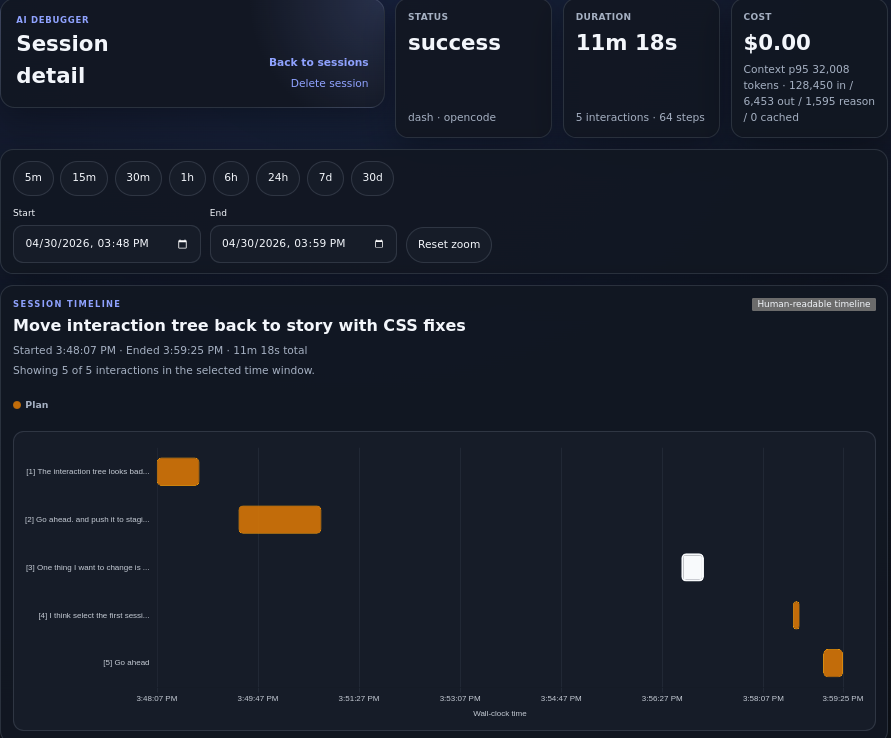
The session detail page gives you the whole run at a glance: status, duration, cost, token totals, time controls, and the captured interaction timeline.
Timeline zoom
The session detail page supports dashboard-style time filtering:
- Choose a preset range from the toolbar
- Enter custom
StartandEndtimes - Drag across the session timeline to zoom into a specific time region
- Click an interaction bar to load that interaction below the session timeline
- Use
Reset zoomto return to the full session range
Dragging only zooms after intentional pointer movement, so normal clicks still select interactions.
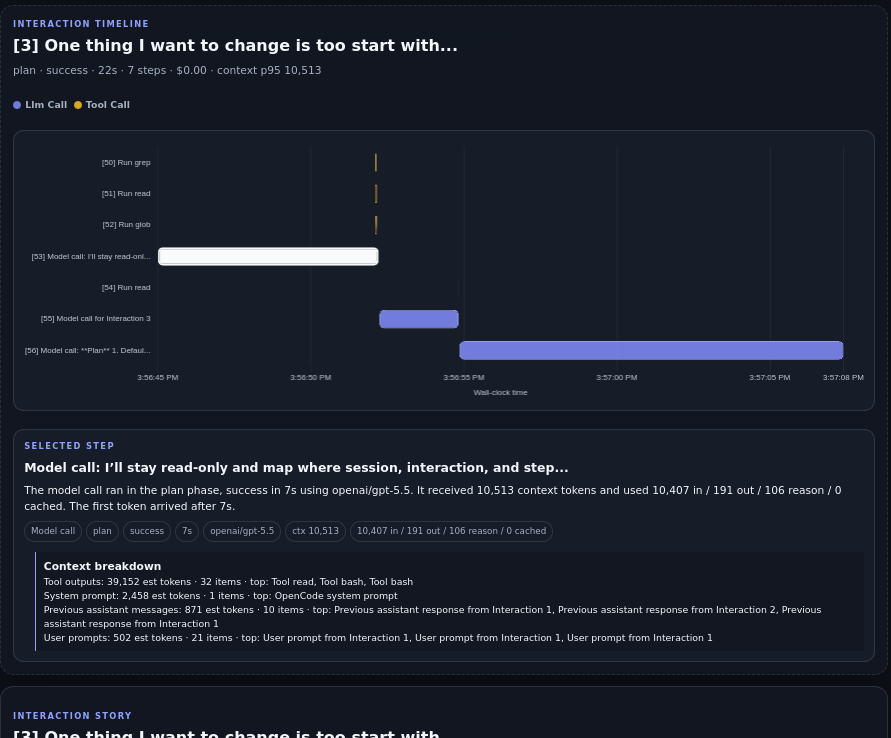
After selecting an interaction, Agent Debugger shows the lower-level step timeline and the selected step details, including model call metadata and context breakdowns when available.
Troubleshooting
Enable plugin debug logging when you need to inspect startup, auth, or upload behavior:
DISTLANG_OPENCODE_DEBUG=1 opencodeUseful overrides:
DISTLANG_BIN=/path/to/distlang opencode
DISTLANG_STORE_BASE_URL=https://api-staging.distlang.com opencode
DISTLANG_AUTH_BASE_URL=https://auth-staging.distlang.com opencode
DISTLANG_OPENCODE_LOG_FILE=/tmp/distlang-opencode.log opencode
To confirm uploads are visible after a run:
distlang helpers request GET /agent-debugger/v1/sessions --jsonIf uploads are not appearing, run /distlang-status inside OpenCode first. It reports whether uploads are enabled, whether auth is available, and whether recent Agent Debugger sessions are visible.
To stop future uploads and clear your local Distlang auth session, run /distlang-stop inside OpenCode.